3.2 Docker Environment
Setting up your local docker environment for this lab.
Environment Setup
With completing this section the environment is configured. However, in the next few steps we will build theorder microservice and its container. After this section you will not be able
to start the environment as this container is still missing. You will be able to start it later.Changes to the docker-compose file
To split the monolith in two microservices we need to change our docker-compose.yaml file.
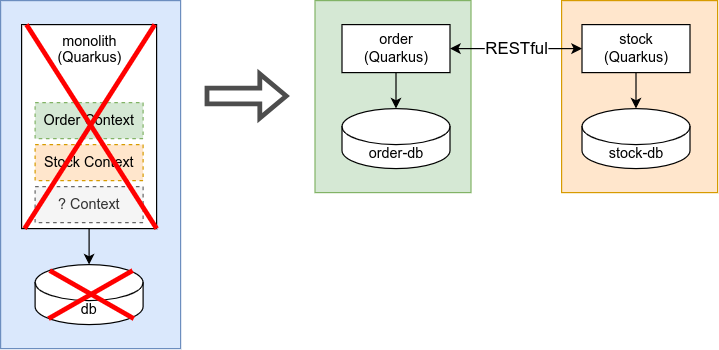
Microservice container specification
First we deleted the application and application-db specification which belonged to our monolith. Then we created a specification for the two microservices order and stock.
As we are building the order service by ourselves we reference a local container image. The stock service uses a pre-built image from the quay.io/acend registry.
| |
As both microservices need their own postgres database we added two databases to our docker-compose.yaml.
| |
Task 3.2.1 - Inspecting the docker environment
Have a look at the /code/rest/docker folder and get familiar with the docker environment specified in docker-compose.yaml.
Last modified February 12, 2024: fix debezium lab version (9e6013e)