3.6 Distributed Transactions (optional)
Optional Section
The following content is optional. If you have time, feel free to proceed.
Implementation
Do not make the described changes below to your implementation.
The only code change needed is described in Task 3.6.2 and targets your docker-compose.yaml file.
In this section we explain the changes made to the order and stock microservice. At the end of the section you will
be switching to the provided pre-built docker images which contain all these changes.
Both our microservices use local transactions to store their data. There are several cases where data may get out of sync between
order and stock microservice.
Problem
Think of the following scenario.
- New order is requested using the RESTful API
- Order microservice will create and store a new order
- Order microservice will trigger the
stockmicroservice to change the amount of in-stock items. - Stock microservice changes the stock count and returns successfully.
- Order microservice fails for any reason
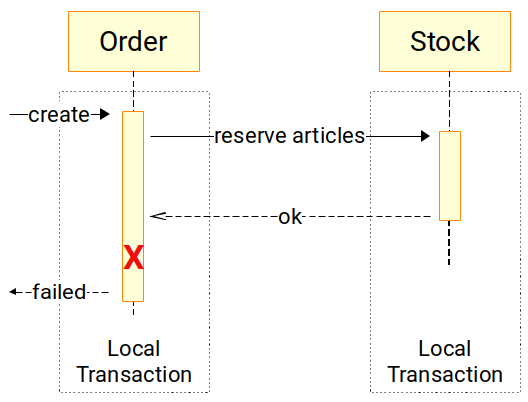
Since the stock successfully applied the reservation, and the order microservice failed, this results in an inconsistent state.
MicroProfile LRA (Long Running Actions)
Motivation for Long Running Actions
The proposal introduces annotations and APIs for services to coordinate long running activities whilst still maintaining loose coupling and doing so in such a way as to guarantee a globally consistent outcome without the need to take locks on data. […]
Traditional techniques for guaranteeing consistency in distributed environments has focused on XA transactions where locks may be held for long periods thereby introducing strong coupling between services and decreasing concurrency to unacceptable levels. Additionally, if such a transaction aborts then valuable work which may be valid will be rolled back. In view of these issues an alternative approach is desirable. - github.com/eclipse/microprofile-lra
LRA Protocol Sequence - source: github.com/eclipse/microprofile-lra
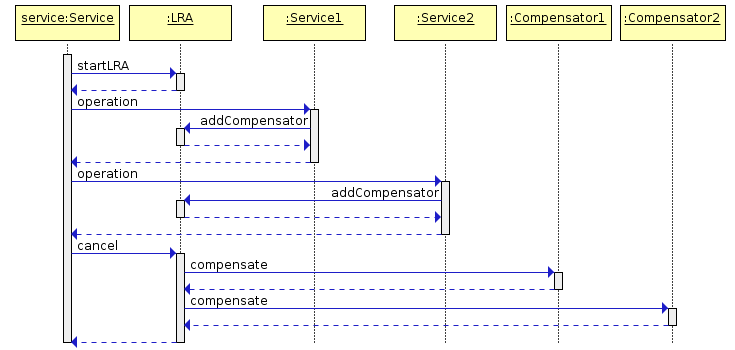
The MicroProfile LRA is built for microservices with RESTful communication. Each microservice participating in a LRA will have to provide a compensate action which will be invoked if the transaction is cancelled. The life cycle of LRAs can be managed by annotating the JAX-RS resources with the following annotations.
| Annotation | Description |
|---|---|
@LRA | Controls the life cycle of an LRA. |
@Compensate | Indicates that the method should be invoked if the LRA is cancelled. |
@Complete | Indicates that the method should be invoked if the LRA is closed. |
@Forget | Indicates that the method may release any resources that were allocated for this LRA. |
@Leave | Indicates that this class is no longer interested in this LRA. |
@Status | When the annotated method is invoked it should report the status. |
@AfterLRA | When an LRA has reached a final state the annotated method is invoked. |
| Source: github.com/eclipse/microprofile-lra |
See the basic sample below.
| |
Source: github.com/eclipse/microprofile-lra
Handling Compensations
What does providing a compensation mean to our microservices?
Each operation like order creation is run in a LRA context. The LRA context is reflected by an
associated lra Id. The lraId will be injected in the HTTP-Headers. The call for compensation will also contain
this id. This means that we must be able to revert our database changes by using the lra id whenever a REST call is
made to the method annotated with @Compensate.
Task 3.6.1 - How to track LRAs
Think of compensating an order, which changes are necessary to our entities that we can revert the change later on?
Task Hint
Lets assume the LRA with id lra-1 needs to be compensated.
To compensate the database changes we need to know:
- Which order is created by
lra-1- If the order is compensated we set a different order status
- Which articles were reserved by
lra-1- If the order is compensated we have to revert the stock deduction
For this to achieve a simple approach could be:
- Store
lra-1which was used to create the order in theShopOrderentity. - Track the
ArticleOrderwith the associatedlra-1in thestockmicroservice as a new table/entityarticlestockchange
Database Changes
This leads to the following changes in our database schema for the order microservice.
| |
On the stock microservice we will add the following migration to create a new table articlestockchange.
| |
LRA Coordinator
The LRA management will be made by an LRA coordinator. The Narayana Transaction Manager1, which is the default JTA Transaction manager in Quarkus and WildFly Application servers, provides an implementation of an LRA Coordinator.
We will use this coordinator for our environment. Therefore, the following changes are made in the docker/docker-compose.yaml:
Add LRA Coordinator (do not forget to add the volume)
| |
Dependencies
Our application includes the following dependency in the pom.xml.
| GroupId | ArtifactId | Description |
|---|---|---|
org.jboss.narayana.rts | narayana-lra | Provides MicroProfile LRA implementation |
Bridged Docker Network
The library uses the base url extracted form the request-uri to register itself at the LRA Coordinator. Our
lab runs in a bridged docker network. Our requests are made to localhost with the mapped port of the docker host and
are bridged to the container port inside the docker network.
This is why the order microservice would register itself as localhost if we call the order microservice with http://localhost:8080/shop-orders from the docker host.
To fix this environment specific issue we rewrite the host of the incoming requests from localhost to order.
The registering at the LRA coordinator is therefore made correctly with order instead of localhost
To fix the docker network issue and specify the needed system variables we add the following to the order container specification:
| |
Using LRAs
Now we are going to change our code to make use of LRAs. We have to annotate the JAX-RS resources with the specific LRA-Annotations.
Changes in Order Microservice
We have to make the following changes to our ch.puzzle.mm.rest.order.boundary.ShopOrderResource
Annotate the POST method createShopOrder and specify the HeaderParams to be used to extract the LRA ID.
The extracted LRA ID will be stored in the database to be able to complete or compensate the LRA.
| |
Implement @Complete method and set the COMPLETE status for this order. The LRA expects us to return the Status.
| |
Implement @Compensate method and set the INCOMPLETE status. Also return the Status for the LRA.
| |
Further you have to add a simple method to extract the LRA-id
| |
Complete Source of ShopOrderResource
We have also added method to the ShopOrder entity to change the ShopOrder by a given lraId. The entity also includes the lra field which we’ve been added to our database schema.
| |
Our ShopOrderService now takes an additional argument the lraId which is stored in the newly created field on the ShopOrder entity.
| |
Complete Source of ShopOrderService
At the end we switch our rest-client to the LRA-Enabled version for the stock service by changing the path to @Path("/lra/article-stocks").
Complete Source of ArticleStockService
Changes in Stock Microservice
Pre-built Container
The pre-built version ofquay.io/acend/microservices-lab-rest-stock:latest supports both versions, the
original one and the LRA enabled rest endpoint. That’s why there exists a second JAX-RS resource ArticleStockLraResource
in the solution code.We have to make the following changes to our ch.puzzle.mm.rest.stock.boundary.ArticleStockResource
Annotate the POST method createStockOrder and specify the HeaderParams to be used to extract the LRA ID.
The extracted LRA ID will be stored in the database to be able to complete or compensate the LRA.
| |
Implement @Complete method to just return the LRA status.
| |
Implement @Compensate method which uses the stored LRA from the database and adds the reserved (decreased)
amount of an article to the stock count.
| |
Complete Source of ArticleStockLraResource
Changing to the LRA enabled version
To change to the LRA version, switch to the pre-built docker images.
Task 3.6.2 - Switching to the pre-built images
We provide a docker-compose.solution.yaml docker file which includes all changes necessary to use the LRA enabled version.
You may simply start the environment using this docker-compose file. Restart your docker environment with
| |
Source of docker-compose.solution.yaml
Task 3.6.3 - Rerun the tests from previous section
Issue the request from the Task 3.5.1.
- What did you observe?
- Is there any difference?
- Is the data consistent between
stockandordermicroservice? - What’s the role of a transaction in this case?
- What’s the role of the LRA coordinator?
Use the chaos-monkey rest endpoint to inject an errors at the order microservice.
| |
- Rerun some tests with the monkey in place. What did happen?
You may delete the ChaosMonkey on the order microservice with
| |
Now create a chaos-monkey at the stock microservice:
| |
Now rerun some tests with the monkey on the stock microservice.
- Is your data still consistent?
Task Hint
Using LRAs the LRA coordinator tracks the state of the LRA. If an error is occurred it will notify every participant of
the LRA about the error by triggering the method annotated with @Compensate. Since our microservices now track which
entities have been created in which LRA contexts they are able to revert or compensate the changes.
You may see this clearly in the logs of the stock or order microservice.
| |
Narayana Transaction Manager: https://narayana.io ↩︎