4.6 Using the Lab
Test your microservice
If your microservices are all up and running, open two tabs in your browser. View the kafka-viewer microservice on http://localhost:8082 and open up the Jaeger UI on http://localhost:16686 . The kafka-viewer will open up an active connection to your kafka topics and show you messages passing through the topics. In the Jaeger UI you can follow your traces through the system.
Now fire a request against the order API to create a new shop order. Let’s do a POST request to our /shop-orders endpoint and create a shop order with 2 pieces of article 1 and 3 pieces of article 2.
Request Task Hint
Create the POST request with curl.
| |
Check your browser and see what insights the kafka-viewer and the Jaeger UI give us. You can clearly see where the event was passing through our system in the Jaeger UI. The trace passes from the order microservices’ ShopOrderResource REST resource to the shop-order-request topic on kafka (seen in the kafka viewer) with some content like:
| |
Will then be passed to the shop-order-confirmation topic to be again confirmed by the order microservice! Our workflow now works.
Task 4.6.1 - Follow your traces through the code
Can you follow the traced produced and observed in the Jaeger UI through your own code?
Task 4.6.2 - Compensation instead of confirmations
Can you try to get a compensation event to test your compensation workflow as well? Try to provoke an error to make the stock microservice deny the order!
Compensation Hint
Create the POST request similar to the one before, but let the article amounts go nuts! That way the stock microservice will throw a ArticleOutOfStockException.
| |
Task 4.6.3 - Observability test
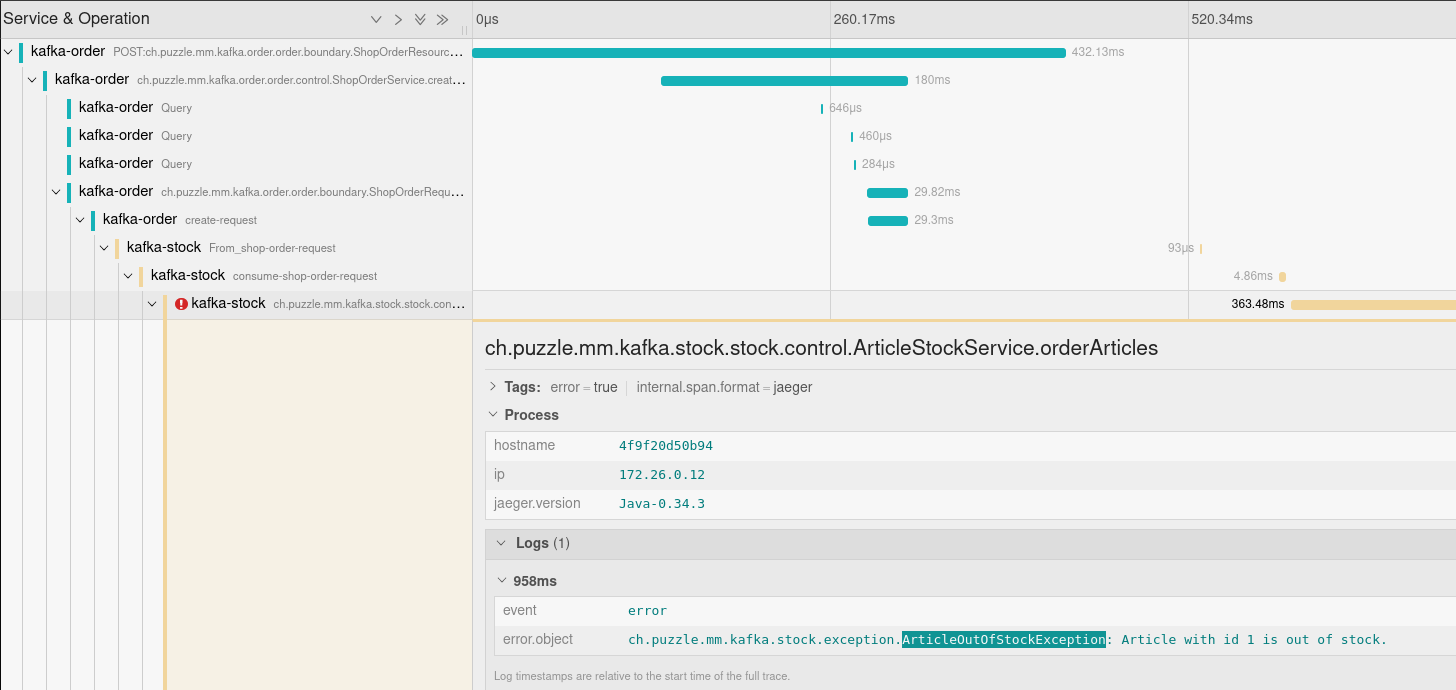
Can you identify where the problem was in the previous request by just using our observability stack?
Observability Hint
Of course you can! Head over to the Jaeger UI and inspect the latest traces. You will directly see a trace with two errors. If you open the trace and inspect the spans you can investigate the error that happened and you will find the wanted ArticleOutOfStockException.
Task 4.6.4 - Enhance and Test observability (optional)
Optional Section
The following content is optional. If you have time, feel free to proceed.
Your task now is to enhance the observability in your order microservice. We would like to see metrics to see how many messages we produce and consume in the microservice. In order to do this you will add metrics to your microservice to track:
- order_requests_produced
- order_confirmation_consumed
- order_compensation_consumed
Hint: In other labs you have already exposed custom metrics. Try to implement your own now!
Observability Hint 2
You can annotate your existing functions which handle incoming and outgoing messages with your custom metric like this:
| |
You can implement the consuming counterpart just the same!
Can you identify with your newly implemented metrics after rebuilding and rerunning your system how many messages were confirmed and compensated after some requests?