5.2 Docker Environment
Setting up your local docker environment for this lab.
Environment Setup
With completing this section the environment is configured. However, in the next few steps we will build theorder microservice and its container. After this section you will not be able
to start the environment as this container is still missing. You will be able to start it later.Changes to the docker-compose file
The setup for this lab is similar as the previous. However, we use Kafka Connect with Debezium PostgreSQL connector to write messages to Kafka.
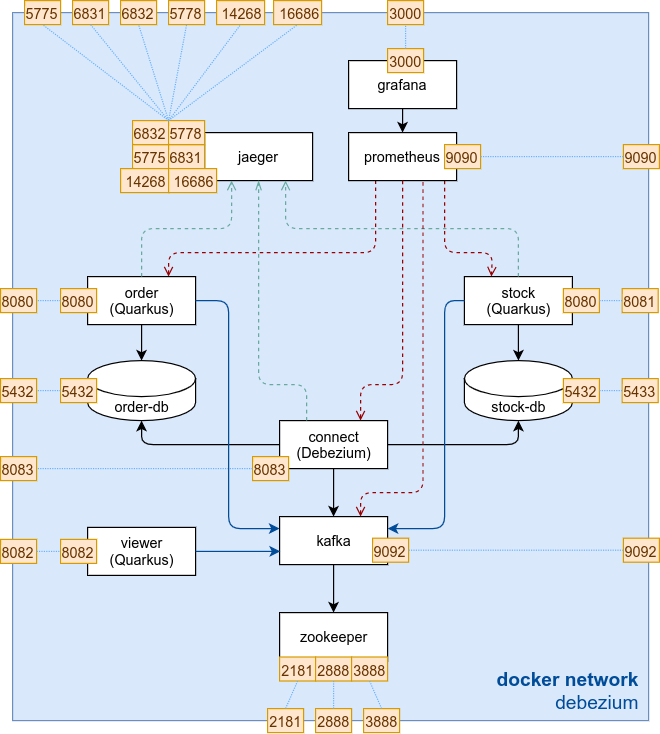
Kafka Connect with Debezium
For Kafka Connect a pre-built docker container based on the Kafka Strimzi image will be used.
The following was added to the docker-compose.yaml file:
| |
Database docker image
The Debezium PostgreSQL Connector needs to access the WAL log. We therefore switch to the quay.io/debezium/postgres:13 image maintained by Debezium. This image provides us the configurations and permissions needed to access the WAL log.
The following changes have been made in the docker-compose.yaml file:
order-db: changed image toquay.io/debezium/postgres:13stock-db: changed image toquay.io/debezium/postgres:13
Task 5.2.1 - Inspecting the docker environment
Have a look at the /code/debezium/docker folder and get familiar with the docker environment specified in docker-compose.yaml.
Last modified February 12, 2024: fix debezium lab version (9e6013e)