5.6 Event Handling
Fire and consume events.
In the previous section we defined our events. Now let’s have a look at the application logic to fire and consume these.
Event overview
We will build the following event flow. Keep in mind that messages are not directly written to Kafka.
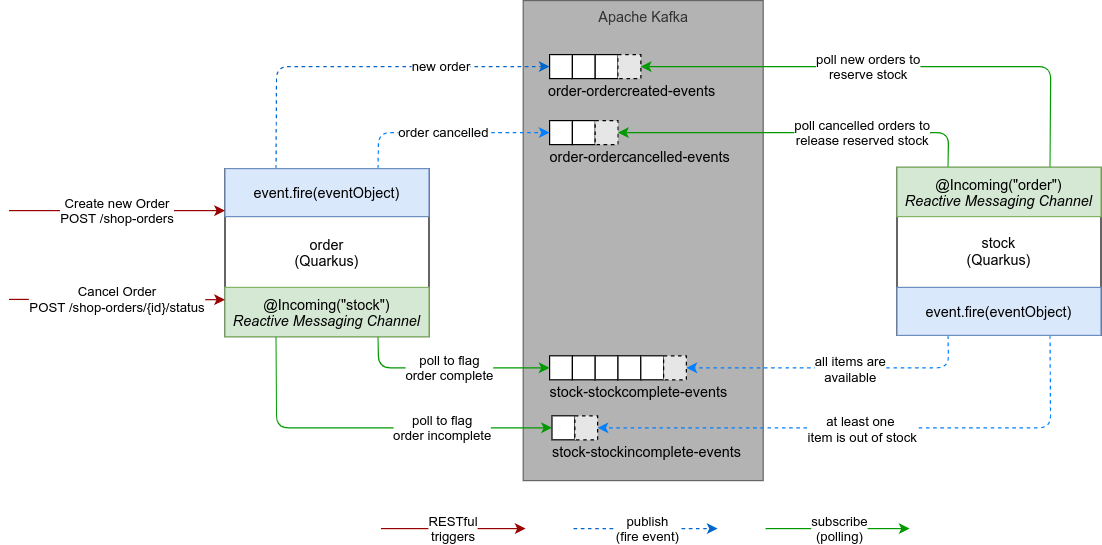
Creating Orders
New orders are received by requests to our RESTful API /shop-orders. They are handled by the ch.puzzle.mm.debezium.order.boundary.ShopOrderResource.
The required POST body corresponds to the ShopOrderDTO class.
1
2
3
4
5
6
7
8
| {
"articleOrders" : [
{
"articleId" : 1,
"amount" : 3
}
]
}
|
Task 5.6.1 - Implement order creation and fire event
The actual work for creating an order is done by method createOrder in ch.puzzle.mm.debezium.order.control.ShopOrderService class.
1
2
3
4
5
6
7
8
9
| public ShopOrder createOrder(ShopOrderDTO shopOrderDTO) {
// TODO: implementation - create ArticleOrder list
// TODO: implementation - create new shopOrder
// TODO: fire OrderCreatedEvent
return new ShopOrder();
}
|
Finish implementation of the createOrder Method:
- Create list of
ArticleOrder entities from article list in ShopOrderDto - Create a new
ShopOrderstatus: Set to ShopOrderStatus.NEWarticleOrders: Set created list of ArticleOrder- persist the order
- Fire the
OrderCreatedEvent event - Return the newly created order
Hint list of ArticleOrder creation
1
2
3
| List<ArticleOrder> articleOrders = shopOrderDTO.articleOrders.stream()
.map(s -> new ArticleOrder(s.articleId, s.amount))
.collect(Collectors.toList());
|
Hint ShopOrder creation
1
2
3
4
5
| // store order to shopOrder table
ShopOrder shopOrder = new ShopOrder();
shopOrder.setStatus(ShopOrderStatus.NEW);
shopOrder.setArticleOrders(articleOrders);
shopOrder.persist();
|
Hint event firing
Fire events with
1
2
| // fire event (outbox table)
event.fire(new OrderCreatedEvent(Instant.now(), shopOrder));
|
Complete Task Hint
1
2
3
4
5
6
7
8
9
10
11
12
13
14
15
16
17
18
19
20
21
22
23
| @ApplicationScoped
public class ShopOrderService {
@Inject
Event<ExportedEvent<?, ?>> event;
public ShopOrder createOrder(ShopOrderDTO shopOrderDTO) {
List<ArticleOrder> articleOrders = shopOrderDTO.articleOrders.stream().map(s -> new ArticleOrder(s.articleId, s.amount)).collect(Collectors.toList());
// store order to shopOrder table
ShopOrder shopOrder = new ShopOrder();
shopOrder.setStatus(ShopOrderStatus.NEW);
shopOrder.setArticleOrders(articleOrders);
shopOrder.persist();
// fire event (outbox table)
event.fire(new OrderCreatedEvent(Instant.now(), shopOrder));
return shopOrder;
}
// ...
}
|
Cancelling Order
In this lab you can delete orders by POST to /shop-orders/{id}/status. For simplicity cancelling is only allowed if the order is in state completed (stock have been deducted).
Task 5.6.2 - Implement order cancellation and fire event
Limited lab duration
This step is already implemented. For a better understanding we encourage you to have a quick read but you may also skip it.
The actual work for cancelling an order is done by cancelOrder method in ch.puzzle.mm.debezium.order.control.ShopOrderService class.
- Fetch the
ShopOrder by orderId (already done) - Check Status (already done)
- Set
status of order to ShopOrderStatus.CANCELLED - Fire the
OrderCancelledEvent event - Return the modified order
Complete Task Hint
1
2
3
4
5
6
7
8
9
10
11
12
13
14
15
16
17
18
19
| @ApplicationScoped
public class ShopOrderService {
@Inject
Event<ExportedEvent<?, ?>> event;
// ...
public ShopOrder cancelOrder(long orderId) {
ShopOrder order = ShopOrder.getByIdOrThrow(orderId);
if (order.getStatus().canCancel()) {
order.setStatus(ShopOrderStatus.CANCELLED);
event.fire(new OrderCancelledEvent(Instant.now(), order));
return order;
} else {
throw new IllegalStateException("Cannot cancel Order " + orderId);
}
}
}
|
Consuming Stock Events
The following configuration defines the incoming stock channel containing the messages from the Kafka topics stock-stockcomplete-events and stock-stockincomplete-events
1
| mp.messaging.incoming.stock.topics=stock-stockcomplete-events,stock-stockincomplete-events
|
Our event consumer class is the ch.puzzle.mm.debezium.event.boundary.KafkaEventConsumer.
Task 5.6.3 - Consuming Kafka messages
Consume incoming events in KafkaEventConsumer and delegate the processing to the StockEventHandler.
Finish implementation of onMessage in ch.puzzle.mm.debezium.event.boundary.KafkaEventConsumer
1
2
3
4
5
6
7
8
9
10
11
12
13
14
15
| public CompletionStage<Void> onMessage(KafkaRecord<String, String> message) {
return CompletableFuture.runAsync(() -> {
try (final Scope span = tracer.buildSpan("handle-stock-message")
.asChildOf(TracingKafkaUtils.extractSpanContext(message.getHeaders(), tracer))
.startActive(true)) {
// TODO: implementation - read id, eventType from headers
// TODO: implementation - delegate message to StockEventHandler
} catch (Exception e) {
logger.error("Error while preparing articlestock", e);
throw e;
}
}).thenRun(message::ack);
}
|
- Annotate method
onMessage as handler for the incoming stock channel with @Incoming(...). - Read the Kafka Headers
id and eventType from the message using getHeadersAsString. - Inject the
StockEventHandler and delegate processing to onStockEvent of StockEventHandler
Incoming definition Hint
Channels (incoming or outgoing) can be annotated on method level with @Incoming.
1
2
| @Incoming("stock")
public CompletionStage<Void> onMessage(KafkaRecord<String, String> message) { }
|
Read Kafka Headers Hint
Use the provided method getHeaderAsString.
1
2
| String eventId = getHeaderAsString(message, "id");
String eventType = getHeaderAsString(message, "eventType");
|
Calling StockEventHandler Hint
1
2
3
4
5
6
| stockEventHandler.onStockEvent(
UUID.fromString(eventId),
eventType,
message.getKey(),
message.getPayload(),
message.getTimestamp());
|
Complete Task Hint
 1
 2
 3
 4
 5
 6
 7
 8
 9
10
11
12
13
14
15
16
17
18
19
20
21
22
23
24
| @Incoming("stock")
public CompletionStage<Void> onMessage(KafkaRecord<String, String> message) {
return CompletableFuture.runAsync(() -> {
try (final Scope span = tracer.buildSpan("handle-stock-message").asChildOf(TracingKafkaUtils.extractSpanContext(message.getHeaders(), tracer)).startActive(true)) {
logger.debug("Kafka message with key = {} arrived", message.getKey());
logHeaders(message);
String eventId = getHeaderAsString(message, "id");
String eventType = getHeaderAsString(message, "eventType");
stockEventHandler.onStockEvent(
UUID.fromString(eventId),
eventType,
message.getKey(),
message.getPayload(),
message.getTimestamp()
);
} catch (Exception e) {
logger.error("Error while preparing articlestock", e);
throw e;
}
}).thenRun(message::ack);
}
|
Task 5.6.4 - Creating an event log
Limited lab duration
This step is already implemented. For a better understanding we encourage you to have a quick read but you may also skip it.
The EventLog class uses the ConsumedEvent entity to keep track of processed events.
1
2
3
4
5
6
7
8
9
10
11
12
13
14
| @ApplicationScoped
public class EventLog {
private static final Logger logger = LoggerFactory.getLogger(EventLog.class);
public void processed(UUID eventId) {
// TODO: implementation - store
}
public boolean alreadyProcessed(UUID eventId) {
// TODO: implementation - check exists
return false;
}
}
|
Transaction management
- Ensure that
processed requires a transaction by using Transactional.TxType.MANDATORY - Ensure that
alreadyProcessed requires a transaction by using Transactional.TxType.MANDATORY
Transaction management Hint
Adding the @Transactional annotation ensures that methods throw an exception if there isn’t an existing transaction context. Annotate both methods with:
1
| @Transactional(value = Transactional.TxType.MANDATORY)
|
Remember that we use the Panache extension and that our entities provide methods to easily query database records. You can get more details about using the Active Record Pattern in Quarkus in the Simplified Hibernate ORM with Panache Guide
.
Implement both EventLog methods.
- Implement method
processed to write a new ConsumedEvent with the eventId and the current timestamp to the database. - Implement method
alreadyProcessed to check the database for having a record with the given eventId.
Complete EventLog Hint
 1
 2
 3
 4
 5
 6
 7
 8
 9
10
11
12
13
14
15
16
17
| @Traced
@ApplicationScoped
public class EventLog {
private static final Logger logger = LoggerFactory.getLogger(EventLog.class);
@Transactional(value = Transactional.TxType.MANDATORY)
public void processed(UUID eventId) {
ConsumedEvent.persist(new ConsumedEvent(eventId, Instant.now()));
}
@Transactional(value = Transactional.TxType.MANDATORY)
public boolean alreadyProcessed(UUID eventId) {
logger.info("Looking for event with id {} in message log", eventId);
return ConsumedEvent.findByIdOptional(eventId).isPresent();
}
}
|
Task 5.6.5 - Processing stock events
Implement the event handling in StockEventHandler
- Check if message is already processed by using the
EventLog. - Depending on
eventType call the corresponding method in ShopOrderServiceStockComplete: deserialize the event and call onStockCompleteEventStockIncomplete: deserialize the event and call onStockIncompleteEvent- If none of them: log warning about an unknown event.
- Register the event as processed using the
EventLog
StockEventHandler Hint
1
2
3
4
5
6
7
8
9
10
11
12
13
14
15
16
17
| public void onStockEvent(UUID eventId, String eventType, String key, String event, Instant ts) {
if (eventLog.alreadyProcessed(eventId)) {
logger.info("Event with id {} was already processed, ignore.", eventId);
return;
}
logger.info("Received '{}' event {} - OrderId: {}, ts: '{}'", eventType, eventId, key, ts);
if (eventType.equalsIgnoreCase("StockComplete")) {
shopOrderService.onStockCompleteEvent(deserialize(event));
} else if (eventType.equalsIgnoreCase("StockIncomplete")) {
shopOrderService.onStockIncompleteEvent(deserialize(event));
} else {
logger.warn("Ignoring unknown event '{}'", eventType);
}
eventLog.processed(eventId);
}
|
Task 5.6.6 - Complete the order management
For the order to be managed completely we have to implement the methods onStockCompleteEvent and onStockIncompleteEvent in our ShopOrderService.
Implement the stock complete event
- Find
ShopOrder in database using the orderId from the event - Set
status to ShopOrderStatus.COMPLETED
OnStockCompleteEvent Hint
1
2
3
4
5
| public void onStockCompleteEvent(ShopOrderStockResponse stockComplete) {
ShopOrder.findByIdOptional(stockComplete.orderId).ifPresent(o -> {
((ShopOrder)o).setStatus(ShopOrderStatus.COMPLETED);
});
}
|
Implement the stock incomplete event
- Find
ShopOrder in database using the orderId from the event - Set
status to ShopOrderStatus.STOCK_INCOMPLETE
OnStockIncompleteEvent Hint
1
2
3
4
5
| public void onStockIncompleteEvent(ShopOrderStockResponse stockIncomplete) {
ShopOrder.findByIdOptional(stockIncomplete.orderId).ifPresent(o -> {
((ShopOrder) o).setStatus(ShopOrderStatus.STOCK_INCOMPLETE);
});
}
|